Are people visiting?
See visitors, sessions and page views instead of wondering whether anyone is actually reaching your website.
Your website can look great and still leave you guessing. EzyGoDigi Analytics shows what happens after people arrive — which pages they view, where they come from, what they click, and which actions matter to your business.
Launching a website tells you that it is online. Analytics tells you what is happening after visitors arrive.
See visitors, sessions and page views instead of wondering whether anyone is actually reaching your website.
See which pages attract attention and understand what content your audience is actually interested in.
Measure important interactions such as WhatsApp, forms, buttons and other configured events.
“1,284 visitors” is useful. Knowing what those visitors did is much more useful.
Understand traffic volume and the sessions reaching your website.
See which pages are attracting attention and where activity is concentrated.
Track important configured events such as clicks, forms and contact actions.
Use your tracked actions and business context to understand where your website can improve.
Give business owners a dashboard they can understand without needing to become analytics specialists.
See visitor activity, sessions, page views and trends over your selected date range.
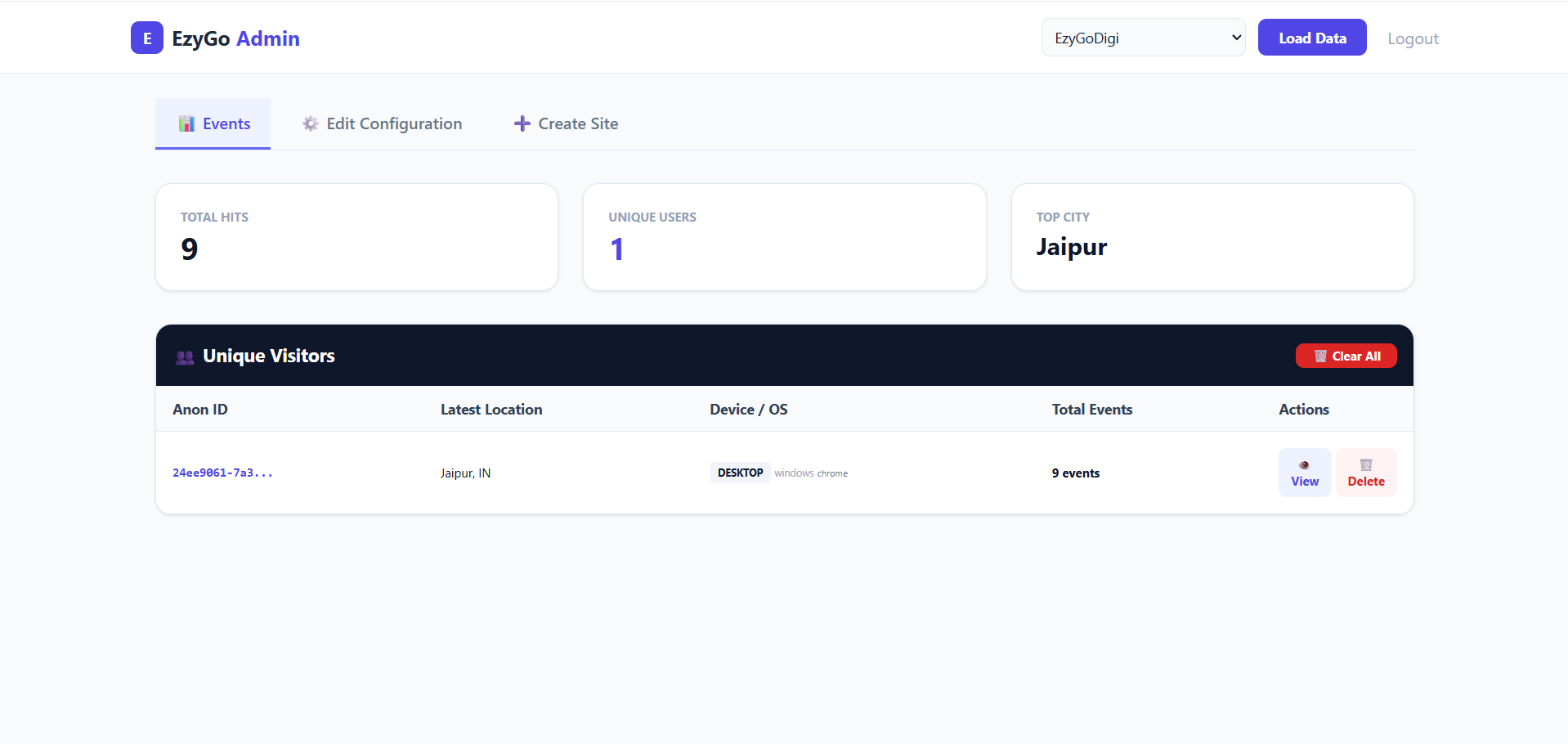
Understand important interactions such as WhatsApp clicks and other configured events.
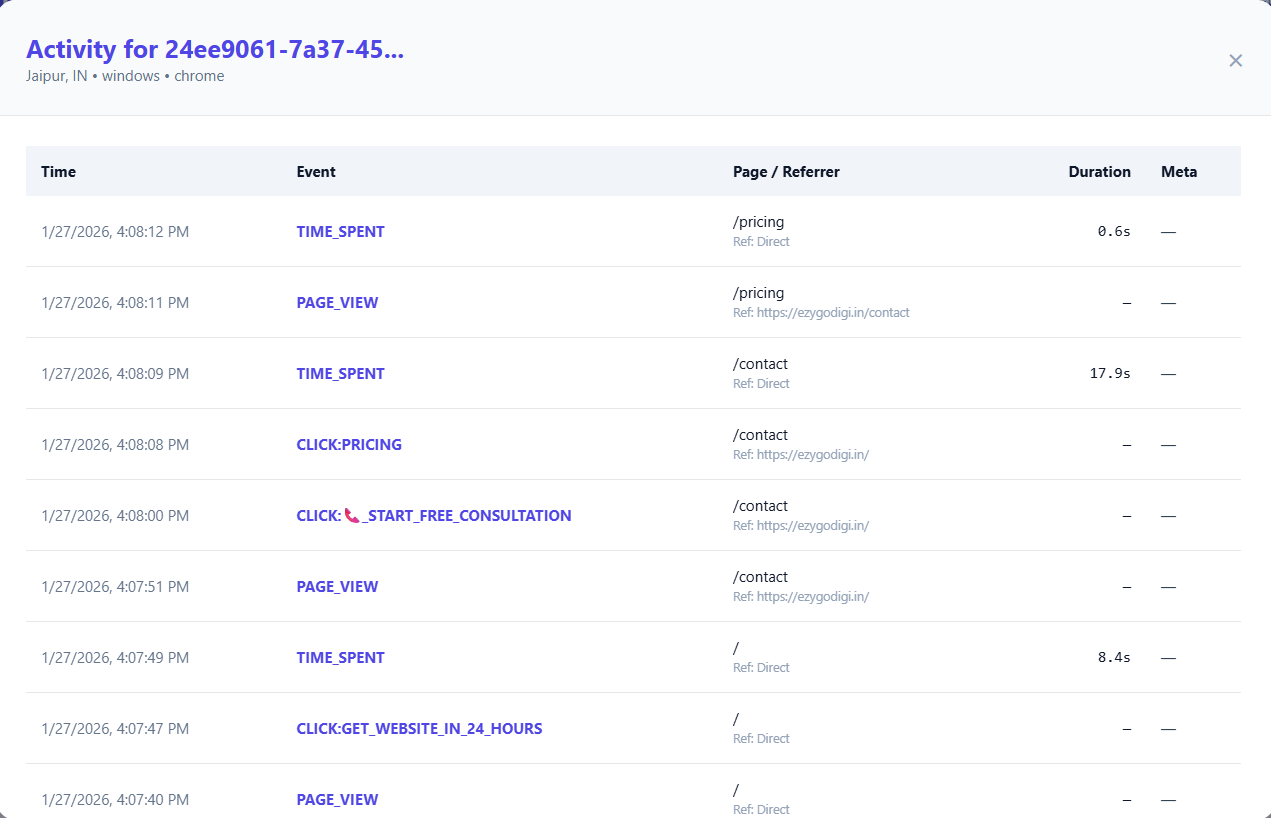
Turn website activity into information you can actually use.
Understand how many visitors are reaching your website and how activity changes over time.
See which pages receive the most attention and where your audience spends time.
Measure configured actions rather than relying only on page-view numbers.
Understand important visitor interactions such as contact and conversion actions.
See referrer and campaign information to understand where website traffic originates.
Understand visitor geography and identify markets generating website activity.
Understand activity across mobile, tablet and desktop visitors.
Analyze visitor activity, sessions and trends instead of looking at isolated numbers.
Every page on your website has a purpose. Analytics helps you see which pages attract visitors and which pages deserve your attention.
Find the pages receiving the most activity.
Explore page, country, referrer and event data together.
Use the data to decide which pages, CTAs or campaigns need improvement.
Traffic volume is only one part of the picture. Understand the source, location and device behind your website activity.
Understand activity arriving through search and how it contributes to website visits.
See which referring sources are sending visitors to your website.
Understand geographic distribution and identify markets generating activity.
See whether visitors are using mobile, tablet or desktop devices.
Your dashboard shows what happened. AI Insights helps summarize what changed, where to look, what may need attention and what actions you can consider next.
AI Insights works from aggregated analytics to compare periods and surface useful patterns across your website activity.
The standard setup is designed around a simple tracking script. EzyGoDigi can also help with installation.
Use the tracking code associated with your website/site configuration.
Place the script in the appropriate website header or integration location.
Once tracking is active, your dashboard can begin showing the configured website activity.
Why turn analytics installation into a project? Add one lightweight script, start collecting website activity, and get back to running your business.
Powerful tools can still mean a lot of setup before you see useful answers.
One simple tracking script gets your website connected to the analytics platform.
<script src="https://ezygodigi.in/track.js" data-id="YOUR_ID"></script>
When EzyGoDigi builds your website, analytics can be included as part of the setup so you don't launch with a beautiful website and no idea what visitors are doing.
Privacy-first tracking is a core part of the product — but your analytics still starts with business visibility.
Designed around a cookieless analytics approach for businesses that want useful website measurement with a privacy-conscious architecture.
AI Insights works from aggregated analytics rather than sending raw visitor identity information to the AI layer.
You don't need another screen full of numbers. You need enough information to decide what to improve next.
| You want to know | Traditional complex analytics can provide data | EzyGoDigi focuses the experience on the answer |
|---|---|---|
| Are people visiting? | Traffic reports | Visitors + sessions + trends |
| Which pages matter? | Page reporting | Top pages + page activity |
| What did they click? | Event configuration | Configured event tracking |
| Where did they come from? | Acquisition reports | Referrers + campaigns |
| What should I look at? | You interpret the reports | AI Insights can summarize patterns and actions |
Useful for businesses that depend on their website for visibility, enquiries, leads, bookings or sales.
Understand visitors and important contact actions on your business website.
Measure early website traction and learn which pages and actions matter.
Connect traffic sources and campaign activity with website behavior.
Manage analytics visibility for client websites from a structured dashboard.
Understand page activity and configured actions throughout the customer journey.
Know whether your website is attracting attention and generating contact actions.
See which pages and calls-to-action are helping potential customers engage.
Use multi-site dashboard access to manage more than one website from a central login.
Choose a plan based on your website's activity and the level of analytics support you need.
For growing businesses that want visibility into their website.
For higher-traffic websites, teams and agencies needing more capacity.
Your website brings the experience. Analytics shows what happens after people arrive. Put both together and you have a much clearer growth loop.
Create a fast, responsive digital presence.
SEO, campaigns, referrals and social channels bring people in.
See pages, events, clicks, sources, locations and devices.
Use analytics and AI Insights to decide what to improve next.
Everything you need to know before adding analytics to your website.
EzyGoDigi Analytics can track website visits, pages, events, visitor activity, traffic sources, referrers, devices, countries and configured conversion actions such as important button clicks.
Yes. Page activity can be analyzed to understand which pages receive visits and which pages are most important to your website traffic.
Yes. WhatsApp and other configured interaction events can be captured so you can understand important actions visitors take on your website.
The standard setup uses a simple tracking script. It can be added to WordPress, Shopify or custom websites. EzyGoDigi can also assist with installation.
EzyGoDigi Analytics is designed with a privacy-first approach and cookieless tracking architecture. Your own privacy notice, consent requirements and legal obligations should still be reviewed for your particular implementation.
Yes. AI Insights analyzes aggregated website analytics and can surface changes, insights, risks, opportunities and recommended actions.
The analytics dashboard supports site-level access and multi-site management use cases, allowing authorized users to access the website or site assigned to them.
It is designed for businesses, startups, agencies and website owners who want a practical view of visitor activity and important website actions without relying on a highly complex analytics workflow.
Still have a question?
Ask on WhatsAppStop guessing. See your visitors, pages, events, traffic sources and important actions — then use the data to make better website decisions.